
らせん階段
階段のみ
作ったのは私というよりAIですが。気軽に作れて便利です。構造計算の試算などで使えます。
スクリプト作成>コードを書く欄にコピペ>Run Scriptを押す
これだけの簡単操作です。
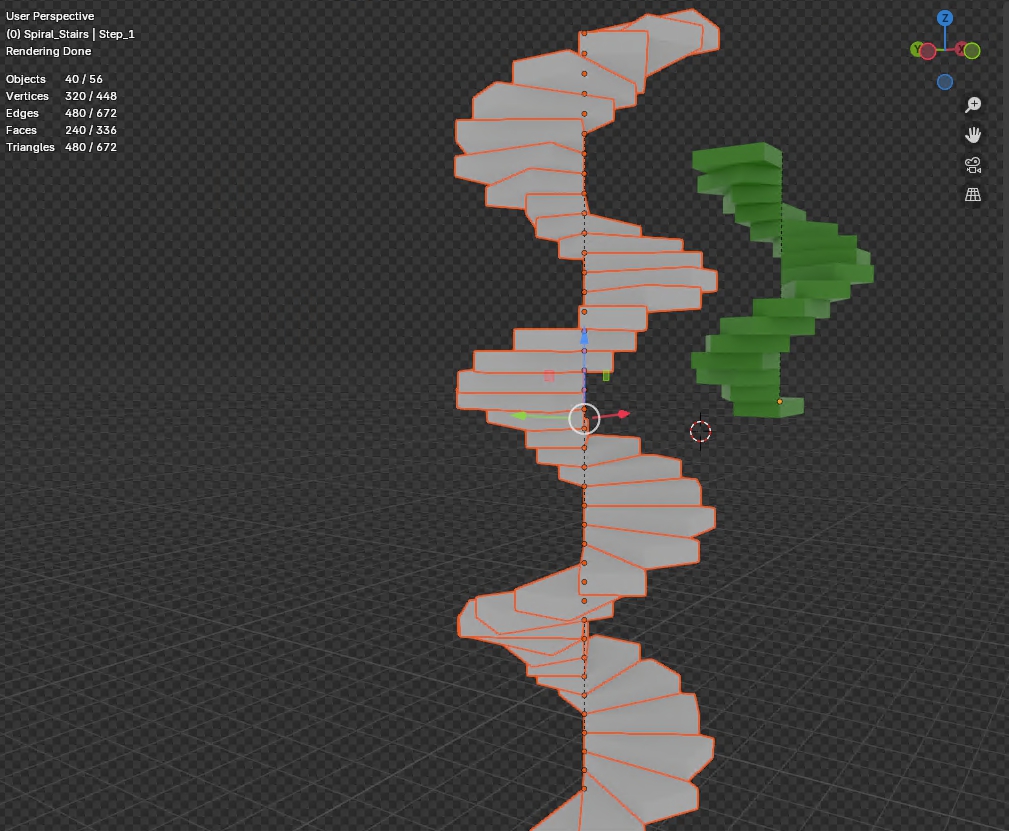
import bpy
import bmesh
import math
from mathutils import Vector
# ===== パラメータ(m単位) =====
step_height = 0.2 # 段高:20 cm
step_depth = 0.6 # 踏み面奥行:60 cm
step_thickness = 0.2 # 厚み:20 cm
step_width = 1.2 # 幅:120 cm
angle_step_deg = 30 # 回転角:30°/段
num_steps = 40 # 段数
# ===== コレクション準備 =====
col_name = “Spiral_Stairs”
if col_name in bpy.data.collections:
col = bpy.data.collections[col_name]
for o in list(col.objects):
bpy.data.objects.remove(o, do_unlink=True)
else:
col = bpy.data.collections.new(col_name)
bpy.context.scene.collection.children.link(col)
first_step = None # 最初のステップを保持
# ===== らせん階段の作成 =====
for i in range(num_steps):
# 1) 新規 BMesh で立方体を生成
bm = bmesh.new()
bmesh.ops.create_cube(bm, size=1.0) # 頂点は [-0.5,+0.5]
# 2) 頂点を実寸にマッピング & 原点を前左上に移動
for v in bm.verts:
# [-0.5,+0.5] → [0,実寸]
v.co.x = (v.co.x + 0.5) * step_width
v.co.y = (v.co.y + 0.5) * step_depth
v.co.z = (v.co.z + 0.5) * step_thickness
# 原点を「正面から見て左、手前上の頂点」に固定
# (前=Y最小、左=X最小、上=Z最大)
v.co -= Vector((0.0, 0.0, step_thickness))
# 3) メッシュ→オブジェクト化
mesh = bpy.data.meshes.new(f”StepMesh_{i+1}”)
bm.to_mesh(mesh)
bm.free()
step = bpy.data.objects.new(f”Step_{i+1}”, mesh)
bpy.context.scene.collection.objects.link(step)
# 4) 回転&上昇
angle = math.radians(i * angle_step_deg)
step.rotation_euler[2] = angle
step.location = Vector((0.0, 0.0, i * step_height))
# 5) コレクションへ移動
col.objects.link(step)
bpy.context.scene.collection.objects.unlink(step)
# 6) 親子設定
if i == 0:
first_step = step
else:
step.parent = first_step
てすり子(ポスト)付きはこちら
中途半端な仕上がり。開発中。
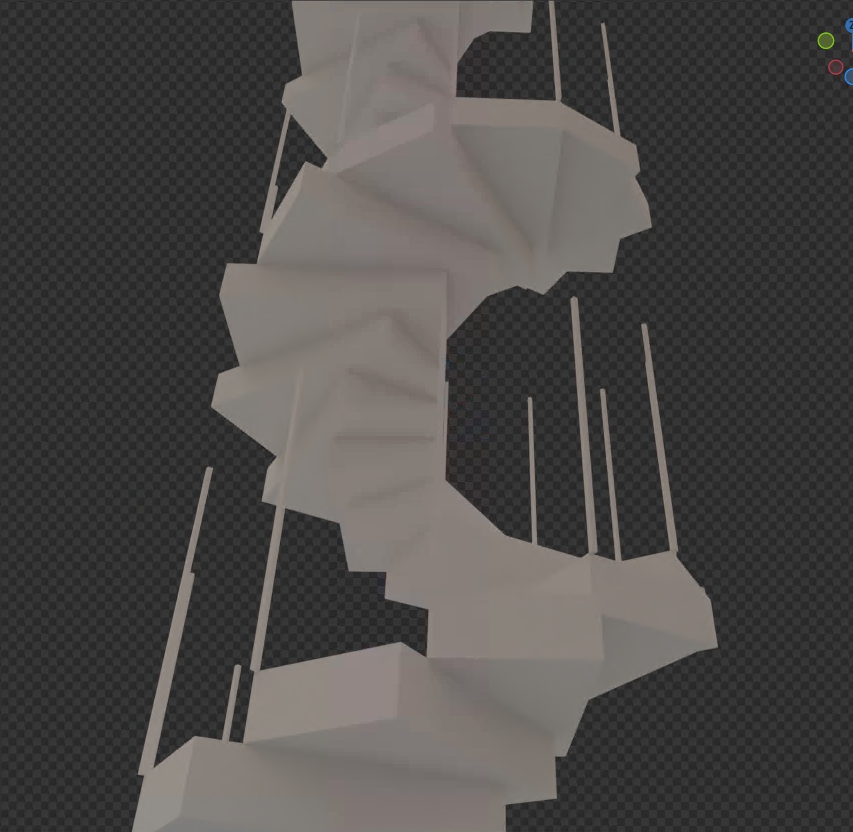
import bpy
import bmesh
import math
from mathutils import Vector
# ===== パラメータ(m単位) =====
step_height = 0.2 # 段高:20 cm
step_depth = 0.5 # 踏み面奥行:50 cm
step_thickness = 0.2 # 厚み:20 cm
step_width = 1.0 # 幅:100 cm
angle_step_deg = 30 # 回転角:30°/段
num_steps = 36 # 段数
# 手すりポストパラメータ
post_width = 0.02 # 断面:2 cm
post_height = 1.1 # 高さ:110 cm
# ===== コレクション準備 =====
col_name = “Spiral_Stairs”
if col_name in bpy.data.collections:
old_col = bpy.data.collections[col_name]
# 含まれるオブジェクトをすべて削除
for obj in list(old_col.objects):
bpy.data.objects.remove(obj, do_unlink=True)
# シーンからコレクションを解除し、コレクション自体を削除
bpy.context.scene.collection.children.unlink(old_col)
bpy.data.collections.remove(old_col)
# ===== 新規コレクション作成 =====
col = bpy.data.collections.new(col_name)
bpy.context.scene.collection.children.link(col)
# ===== メッシュ作成関数 =====
def create_step_mesh(name):
bm = bmesh.new()
bmesh.ops.create_cube(bm, size=1.0)
for v in bm.verts:
v.co.x = (v.co.x + 0.5) * step_width
v.co.y = (v.co.y + 0.5) * step_depth
v.co.z = (v.co.z + 0.5) * step_thickness
# 原点を左前上の頂点に
v.co -= Vector((0.0, 0.0, step_thickness))
mesh = bpy.data.meshes.new(name)
bm.to_mesh(mesh)
bm.free()
return mesh
def create_post_mesh(name):
bm = bmesh.new()
bmesh.ops.create_cube(bm, size=1.0)
for v in bm.verts:
v.co.x = (v.co.x + 0.5) * post_width
v.co.y = (v.co.y + 0.5) * post_width
v.co.z = (v.co.z + 0.5) * post_height
# 原点は底面中央
mesh = bpy.data.meshes.new(name)
bm.to_mesh(mesh)
bm.free()
return mesh
# ===== Step1 と Post1 の生成 =====
step_mesh = create_step_mesh(“StepMesh_1”)
step1 = bpy.data.objects.new(“Step_1”, step_mesh)
step1.rotation_euler = (0.0, 0.0, 0.0)
step1.location = Vector((0.0, 0.0, 0.0))
col.objects.link(step1)
post_mesh = create_post_mesh(“PostMesh_1”)
post1 = bpy.data.objects.new(“Post_1”, post_mesh)
# Post1 の原点を底面中央に維持しつつ、Step1 の右端手前上頂点に配置
post1.location = Vector((step_width, 0.0, 0.0))
post1.parent = step1
col.objects.link(post1)
# ===== 複製による階段とポストの生成 =====
for i in range(1, num_steps):
angle = math.radians(i * angle_step_deg)
z_loc = i * step_height
# ステップ複製
new_step = step1.copy()
new_step.data = step_mesh.copy()
new_step.rotation_euler = (0.0, 0.0, angle)
new_step.location = Vector((0.0, 0.0, z_loc))
col.objects.link(new_step)
# ポスト複製
new_post = post1.copy()
new_post.data = post_mesh.copy()
new_post.parent = new_step
new_post.location = Vector((step_width, 0.0, 0.0))
col.objects.link(new_post)